Attach an antenna to the module
The VTAP50‑MOD reader module has no on‑board antenna. Before you can use any VTAP functionality, it requires connection of an external antenna, with a suitable matching circuit, to the VTAP50‑MOD reader module.
There are options for your first step(s), depending on the stage of your development project:
-
Assemble the VTAP50‑MOD reader module with an already procured matching circuit and antenna.
-
Procure or design a suitable antenna and matching circuit, to suit your integration, which might involve building the required matching circuit into the antenna design;
These are discussed in the sections below
 Assemble VTAP50 reader module, matching circuit and antenna
If you bought a VTAP50 reader module (VTAP50‑MOD) with a separate matching circuit designed for a specific off‑the‑shelf or proprietary antenna (VTAP50-M2-xx) you will need to assemble these components.
Attaching an external antenna to the VTAP50 module uses the 12‑pin expansion header (also used to connect external LEDs).
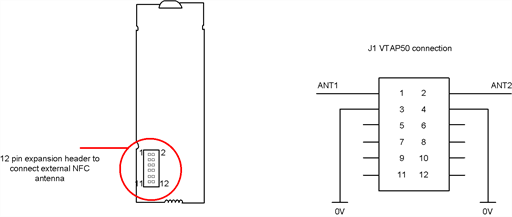
Expansion header to connect external antenna
The pins 1 and 2 on the expansion header are used for external antenna connection.
Attach the matching circuit to this 12‑pin header. Then attach the antenna to the matching circuit board, as in the example below.
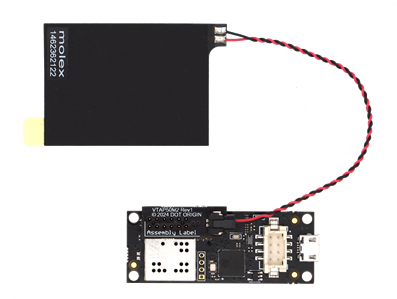
Assembly of VTAP50-MOD reader module with matching circuit and antenna
CAUTION: Always ensure sufficient clearance between the VTAP antenna and other RF transmitters, to avoid electromagnetic interference between equipment. Clearance required varies between antennas, depending on antenna size, power and sensitivity.
Procure or design matching circuit and antenna
If you have not yet chosen or designed an antenna and matching circuit, Dot Origin can provide support for integrating off‑the‑shelf or custom NFC antennas with VTAP25, VTAP50 and VTAP100 readers. Important considerations and examples of tuning circuits suited to specific off‑the‑shelf antennas are provided in the
Note: The VTAP50‑OEM reader board has been RF/EMC tested with its integrated loop antenna, printed on the PCB.
When a new external antenna is attached to a VTAP50 reader
Related reading:
