Examples of VTAP Agent in use
VTAP Agent for Windows enables USB‑connected readers (and reader boards) to be integrated with web applications, either via VTAP Cloud or when running in a local browser.
Here are some potential uses of a VTAP reader connected by VTAP Agent:
With a VTAP reader joined to a web application, running in a web browser on a Windows PC, the front‑end web app can directly query the VTAP reader and react to taps without having to rely on keyboard emulation or on input fields or forms.
In the scenario below, the VTAP reader is delivering tap payloads into a web page running in the web browser on the computer where the VTAP reader is connected. VTAP Agent operates by running as a local web server that can be queried by simple in-page JavaScript commands, to detect its presence and poll for taps. The web page could be served from a remote web application server.
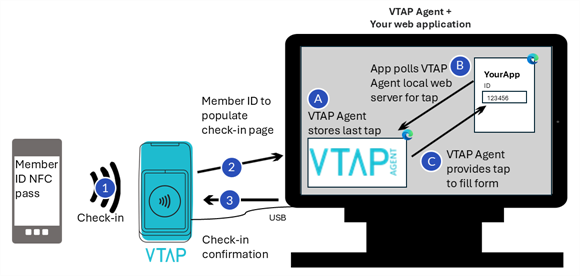
Example use of a VTAP reader with VTAP Agent to check-in on a gym web application
And here is an example of how the VTAP Cloud facilitates both control of your VTAP readers and a simple API interface to your own IT infrastructure. The VTAP reader is monitored and managed by VTAP Cloud, and taps are processed and sent to back‑end web applications using the VTAP Cloud ‘taps to apps’ gateway.

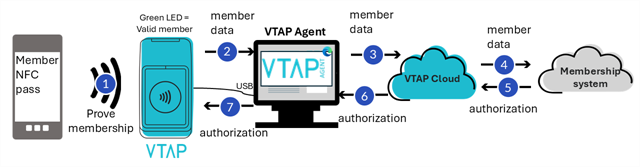
Example use of a VTAP reader with VTAP Agent and VTAP Cloud in proving membership
The VTAP Cloud configuration describes which mobile passes the VTAP reader should read, and a VTAP Cloud application can describe how to forward data from a pass read and any user feedback LEDs or beeps required. The management of readers is all done through the VTAP Cloud, which ensures updates can easily be distributed to a whole fleet of readers, regardless of their locations, as long as they are IP‑connected.
 Related reading:
