Web server for tap data
This section describes how VTAP Agent can make tap data from your VTAP reader available to a remote web page. VTAP Agent will run its own web server for tap data, so that a web page served by a remote web application, such as your web application's enrolment or login form, can access tap payloads using JavaScript.
Tap server settings
After choosing Send Tap data to local web server in the VTAP Reader panel and choosing the Save button  , you can check the settings in the VTAP Agent Tap Server panel:
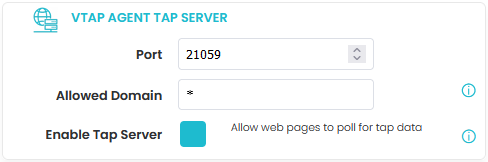
VTAP Agent with a tap server running
The VTAP Agent Tap Server parameters change how the VTAP Agent Tap Server runs:
-
By default the VTAP Agent tap server will use Port 21059, as this is not used by common office applications, but it can be changed to your preferred port if there is a clash with your PC set up. (It is the same Port used by the Dot Origin Read‑a‑Card application for this purpose.)
-
By default, web pages from any domain are allowed to access the tap data. We recommend that you restrict access to a single domain by entering an Allowed Domain name, such as dotorigin.com instead of *.
-
You can choose to enable or disable the tap server in this panel, using the Enable Tap Server check box, if you want to temporarily suspend access to the data without losing other settings. This allows you to test your web page's handling of this scenario.
Choose the Save button in this panel when you are ready to confirm your choices and change your configuration.
JavaScript code example
You can open a VTAP Agent tap server demonstration HTML file, saved during installation, usually under
This file contains JavaScript code that will detect a connected reader, open an asynchronous connection with the web server, and poll for tap data to populate a simple form.
Use this code as a starting point for adjusting your own web application to make use of tap payload data from the VTAP reader.
 Related reading:
